
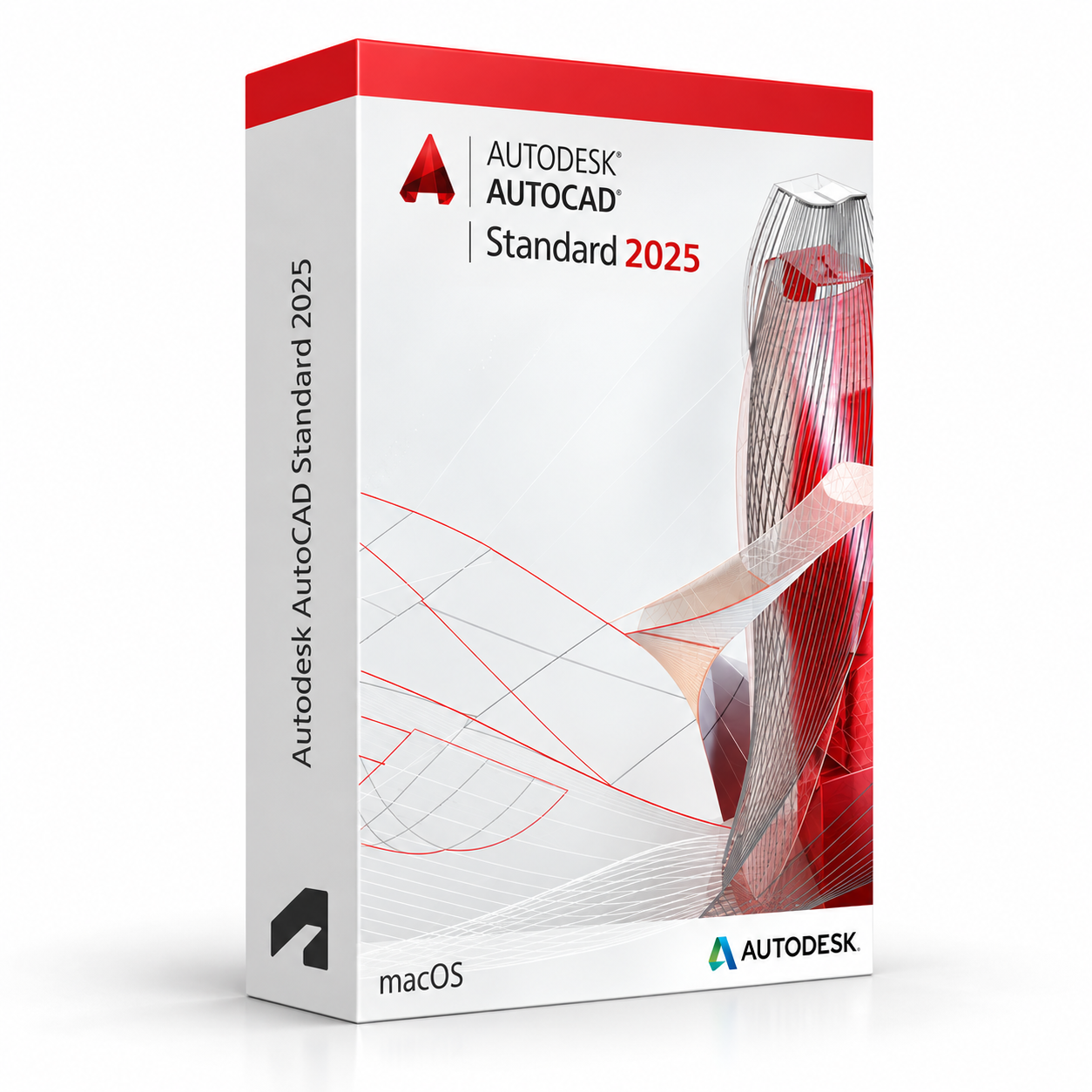
Autodesk AutoCAD 2025 for Mac – UK Digital CAD Licence
Autodesk AutoCAD 2025 for Mac is a professional CAD software solution designed for users who need precise 2D drafting, 3D modelling, technical drawing, DWG editing and design documentation tools on macOS. It is suitable for architects, engineers, designers, CAD students, construction learners and Mac users who need a native AutoCAD workflow.
AutoCAD 2025 for Mac helps users create detailed drawings, floor plans, mechanical layouts, technical documentation, 3D models and design files with industry-standard DWG compatibility. This Mac version includes modern drafting tools, Activity Insights, Hatch improvements, Markup Import and Markup Assist, Trace updates, improved 3D graphics and faster file opening performance.
For a complete design setup, you can also explore our Autodesk software, compare related AutoCAD products, or choose AutoCAD 2025 for Windows if you need the Windows-only specialized toolsets.
Important Notice About AutoCAD 2025 for Mac
Autodesk AutoCAD 2025 for Mac is designed for compatible Apple Mac computers running supported macOS versions. Before purchasing, make sure your Mac meets the required macOS, processor, memory, storage, graphics and display requirements.
AutoCAD specialized toolsets such as Architecture, Mechanical, Electrical, MEP, Map 3D, Plant 3D and Raster Design are Windows-only and are not available natively in AutoCAD for Mac. If you need these specialized toolsets, choose AutoCAD 2025 for Windows instead.
Why Choose Autodesk AutoCAD 2025 for Mac?
- Professional CAD software for 2D drafting and 3D design on macOS
- Designed for architects, engineers, designers, students and CAD users
- Supports DWG files, technical drawings and precise design documentation
- Native AutoCAD workflow for compatible Apple Mac computers
- Useful for floor plans, mechanical drawings, layouts and construction documentation
- Supports Apple silicon and compatible Intel-based Mac computers
- Lifetime access according to this product offer
- Digital delivery by email after order confirmation
- Activation instructions included
- Installation and activation support available when needed
Key Features of AutoCAD 2025 for Mac
- 2D Drafting and Documentation: Create accurate floor plans, technical drawings, layouts, sections, details and construction documentation.
- 3D CAD Modelling: Build and edit 3D models using AutoCAD tools for solids, surfaces, meshes and visual design workflows.
- DWG File Compatibility: Work with industry-standard DWG files for editing, sharing, reviewing and long-term project compatibility.
- Start Tab: Access recent drawings, templates, sample files, online learning content and useful resources from a cleaner opening workspace.
- Activity Insights: View drawing activity and file events to better understand edits, references, plots, version history and collaboration actions.
- Hatch Improvements: Create and edit hatch areas more conveniently, including improved boundary and path-based hatch workflows.
- Markup Import and Markup Assist: Bring drawing revisions from markup files into AutoCAD and review feedback more efficiently.
- Trace Updates: Use improved trace tools for reviewing, commenting and editing drawing feedback.
- 3D Graphics Improvements: Benefit from modernised 3D graphics behaviour, including improved support for the 3D Wireframe visual style.
- File Open Performance: Open 2D drawing files faster thanks to performance improvements in AutoCAD for Mac 2025.
- 2025.1 Enhancements: Activity Insights adds improved search, refresh options, Xref links and shared activities, while multileader and dimension workflows receive practical updates.
AutoCAD 2025 for Mac vs AutoCAD 2025 for Windows
Autodesk AutoCAD 2025 for Mac is a strong choice for users who prefer a native macOS CAD workflow. AutoCAD 2025 for Windows is better if you need the full Windows AutoCAD ecosystem, including specialized toolsets for architecture, mechanical, electrical, MEP, mapping, plant design and raster workflows.
| Feature | AutoCAD 2025 for Mac | AutoCAD 2025 for Windows |
|---|---|---|
| 2D Drafting | Yes | Yes |
| 3D CAD Tools | Yes | Yes |
| DWG Editing | Yes | Yes |
| Native macOS App | Yes | No |
| Apple Silicon Support | Yes | No native Mac support |
| Specialized Toolsets | No, Windows-only | Yes |
| Best For | Mac users who need CAD drafting and DWG workflows | Users who need full AutoCAD with specialized toolsets |
AutoCAD 2025 for Mac vs AutoCAD LT, Revit and Archicad
Autodesk AutoCAD 2025 for Mac is ideal for users who need native macOS CAD software for 2D drafting, 3D modelling and DWG editing. Other design software may be better depending on your workflow, project type and industry requirements.
| Software | Best For | Main Use |
|---|---|---|
| Autodesk AutoCAD 2025 for Mac | Mac CAD users, architects, engineers and designers | 2D drafting, 3D CAD modelling, DWG editing and technical documentation |
| AutoCAD LT for Mac | Users who only need 2D drafting on macOS | 2D drawings, technical documentation and DWG editing without full 3D tools |
| AutoCAD 2025 for Windows | Users who need specialized toolsets | 2D drafting, 3D CAD and Windows-only industry toolsets |
| Autodesk Revit | BIM teams, architects and construction professionals | BIM modelling, building documentation and multidisciplinary project coordination |
| Graphisoft Archicad | Architects and BIM designers using Mac or Windows | Architectural BIM design, building modelling and construction documentation |
Which Software Should You Choose?
- Choose Autodesk AutoCAD 2025 for Mac if you need native macOS CAD software for 2D drafting, 3D modelling and DWG editing.
- Choose AutoCAD 2025 for Windows if you need specialized toolsets such as Architecture, Mechanical, Electrical, MEP, Map 3D, Plant 3D or Raster Design.
- Choose AutoCAD LT if you only need 2D drafting and do not need full 3D CAD tools.
- Choose Autodesk Revit if your workflow is focused on BIM modelling and building coordination.
- Choose Graphisoft Archicad if you need architectural BIM software with a dedicated building design workflow on Mac or Windows.
Recommended Products
- Autodesk Software – compare AutoCAD, Revit, 3ds Max, Maya, Inventor and other Autodesk tools.
- Autodesk AutoCAD – explore more AutoCAD versions for Windows and macOS.
- Autodesk AutoCAD 2025 for Windows – recommended if you need specialized toolsets.
- AutoCAD LT – suitable for 2D drafting and lightweight CAD documentation.
- Graphisoft Archicad – suitable for architectural BIM design and building documentation.
- Microsoft Office – useful for project documents, spreadsheets, reports and client presentations.
System Requirements for Autodesk AutoCAD 2025 for Mac
| Component | Requirement |
|---|---|
| Platform | Apple Mac computer |
| Operating System | macOS Tahoe 26 requires AutoCAD 2025.2 update; macOS Sequoia 15 requires AutoCAD 2025.1 update; macOS Sonoma 14, macOS Ventura 13 and macOS Monterey 12 are also supported |
| Model | Apple Mac compatible with macOS Monterey or above; Mac models supporting Metal Graphics Engine are recommended |
| Processor | 64-bit Intel CPU or Apple M series CPU |
| Memory | Basic: 8 GB RAM; recommended: 16 GB RAM or higher |
| Display | Basic: 1280 x 800 display; high resolution: 2880 x 1800 with Retina Display |
| Storage | 8 GB free disk space required for download and installation |
| Graphics | Mac native installed graphics card recommended; Metal Graphics Engine support recommended |
| Pointing Device | Apple compatible mouse, Apple compatible trackpad or Microsoft compatible mouse |
| Disk Format | APFS, encrypted APFS, Mac OS Extended Journaled, or encrypted Mac OS Extended Journaled |
| Large Datasets and 3D Work | 32 GB RAM or more recommended for large datasets, point clouds and heavier 3D modelling workflows |
| Internet | Required for download, installation, sign-in, activation, updates and Autodesk account access |
Delivery and Activation
- Product: Autodesk AutoCAD 2025 for Mac
- Platform: macOS
- Licence Type: Digital licence
- Use Type: Educational, personal and non-commercial use
- Licence Duration: Lifetime access according to this product offer
- Delivery Method: Digital delivery by email
- Activation: Activation instructions provided after purchase
- Support: Installation and activation assistance available
How to Get Started
- Complete your order for Autodesk AutoCAD 2025 for Mac.
- Receive your product details and activation instructions by email.
- Check that your Mac meets the AutoCAD 2025 for Mac system requirements.
- Download and install AutoCAD 2025 on your compatible macOS device.
- Install the required update if your Mac uses macOS Sequoia 15 or macOS Tahoe 26.
- Sign in with the Autodesk account or activation method provided with your order.
- Follow the activation instructions to complete setup.
- Restart AutoCAD if required and begin your CAD drafting workflow.
- Contact our support team if you need help with installation or activation.
Who Is Autodesk AutoCAD 2025 for Mac For?
- Mac CAD students and training users
- Architects and architectural learners
- Engineers and technical drawing users
- Interior designers and construction learners
- Designers who prefer native macOS software
- Users who need DWG editing and precise technical documentation on Mac
- Users working on 2D drawings, 3D CAD models and design documentation
Important Licence Information
This Autodesk AutoCAD 2025 for Mac licence is intended for educational, personal and non-commercial use. It is suitable for learning, training and personal CAD projects. It should not be used for commercial, industrial or professional client work unless your licence type clearly allows commercial use.
AutoCAD specialized toolsets are Windows-only and are not included natively with AutoCAD for Mac. If you need Architecture, Mechanical, Electrical, MEP, Map 3D, Plant 3D or Raster Design toolsets, choose AutoCAD for Windows instead.
Before purchasing, please make sure your Mac is compatible with AutoCAD 2025 and that this licence type matches your intended use.
What is Autodesk AutoCAD 2025 for Mac?
Autodesk AutoCAD 2025 for Mac is professional CAD software for 2D drafting, 3D modelling, DWG editing, technical drawing and design documentation on compatible Apple Mac computers.
Does AutoCAD 2025 work on Apple silicon Macs?
Yes. AutoCAD 2025 for Mac supports Apple M series processors, as well as compatible 64-bit Intel Mac computers.
Which macOS versions are supported by AutoCAD 2025 for Mac?
AutoCAD 2025 for Mac supports macOS Sonoma 14, macOS Ventura 13 and macOS Monterey 12. macOS Sequoia 15 requires AutoCAD 2025.1 update, while macOS Tahoe 26 requires AutoCAD 2025.2 update.
Does AutoCAD 2025 for Mac include specialized toolsets?
No. AutoCAD specialized toolsets are Windows-only and are not available natively in AutoCAD for Mac. If you need Architecture, Mechanical, Electrical, MEP, Map 3D, Plant 3D or Raster Design toolsets, choose AutoCAD for Windows.
What is new in AutoCAD 2025 for Mac?
AutoCAD 2025 for Mac includes the new Start Tab, Activity Insights, Hatch improvements, Trace updates, Markup Import and Markup Assist, 3D graphics improvements, file open performance improvements and additional 2025.1 workflow updates.
Is AutoCAD 2025 for Mac better than AutoCAD LT for Mac?
AutoCAD 2025 for Mac includes full CAD features for 2D drafting, 3D modelling and DWG workflows. AutoCAD LT for Mac is mainly focused on 2D drafting and does not include the same full 3D capabilities.
Is AutoCAD for Mac the same as AutoCAD for Windows?
No. Both versions support core AutoCAD drafting and DWG workflows, but AutoCAD for Windows includes Windows-only specialized toolsets and some Windows-specific interface features that are not available natively on Mac.
Can I use this licence for commercial projects?
This product is described as an educational licence for personal, learning and non-commercial use. Commercial use requires a licence type that allows commercial work.
How will I receive my AutoCAD 2025 for Mac licence?
Your product details and activation instructions will be delivered digitally by email after order confirmation.
Do you provide installation support?
Yes. Installation and activation support is available if you need help setting up Autodesk AutoCAD 2025 for Mac.


Rosie W. –
The entire experience was excellent from beginning to end. Everything was clear, quick, and problem-free. I really appreciated the reliability and ease of use. It made the whole process stress-free.
Georgia F. –
Great service, worked instantly.
Jessica F. –
The ordering process was simple and easy to follow. I received everything I needed right away, and activation worked without any issues. I really liked how transparent the instructions were. Overall, a very smooth and trustworthy experience.
Lauren H. –
The whole process was efficient, quick, and easy. I didn’t run into any problems, and everything worked exactly as expected. The professional approach gave me confidence that I was in good hands. I’ll definitely be returning the next time I need a reliable solution. A great experience overall.
Chloe F. –
The entire process was smooth and efficient. Everything was activated right away, and I didn’t face any problems. It gave me confidence to know the service was professional and trustworthy. I’m very pleased. Highly recommend.
Chloe B. –
What impressed me the most was how quickly everything was handled. The setup was smooth, and everything worked flawlessly on the first try. I had no doubts throughout the process as everything was clearly explained. Highly recommend this service.
Daniel H. –
The entire process was easy and stress-free. I liked how the steps were clearly explained and simple to follow. The activation was instant, and everything worked flawlessly from the start. It’s rare to find such a reliable and trustworthy service these days. I’ll happily return again.
Mabel S. –
I was a bit unsure at first, but once I followed the instructions it worked fine.
Bradley C. –
The whole process was straightforward. Everything was active in minutes.
Fiona M. –
I didn’t run into any problems during setup. Everything felt normal and smooth.
Charles C. –
The process was straightforward and efficient. Everything worked the first time without issues. It gave me confidence that the service is professional and secure. I’ll be using it again.
Callum T. –
The process wasn’t confusing, just required attention. If you rush through it, you might get stuck.
Alfie B. –
I liked how everything was explained clearly. The process was quick, and activation was seamless. It felt safe and trustworthy the whole way through. I’ll use it again.
Lauren W. –
The setup was smooth and quick. Everything worked on the first try.
Steven A. –
The whole process was stress-free. Everything worked straight away, and I never had to worry about delays. It was quick, reliable, and very professional. I couldn’t be happier.
Hannah B. –
I didn’t need to contact anyone for help, which says enough.
Sheila L. –
Installation was simple, and the product was ready to use shortly after.
Ross S. –
About what I expected, really.
Megan M. –
I was expecting some sort of issue, but it went through fine. Took a few minutes longer than I thought, though.
Layla M. –
Setup felt slow at one point, though it finished without issues.
Peter M. –
I didn’t run into any errors while setting it up.
Jamie H. –
No major complaints. It did what it needed to do without causing problems.
Sheila C. –
Did what it said it would.
Alice S. –
Nothing fancy about it, just a standard process.
Tariq L. –
There were no major issues, but it also wasn’t a smooth click-and-go situation. Still manageable.
Patrick D. –
I was ready for some troubleshooting, but didn’t need to do any.
Chris F. –
I was careful during installation, but it turned out to be easier than expected. No problems afterward.
Sylvia P. –
Took a little time to install, but nothing unusual. Worked fine afterward.
Fiona P. –
No problems on my side.
Pearl T. –
Download speed was good, and setup was simple.
Joe R. –
At one point I thought it might’ve frozen, but it carried on after a short wait. In the end, it worked without errors.