
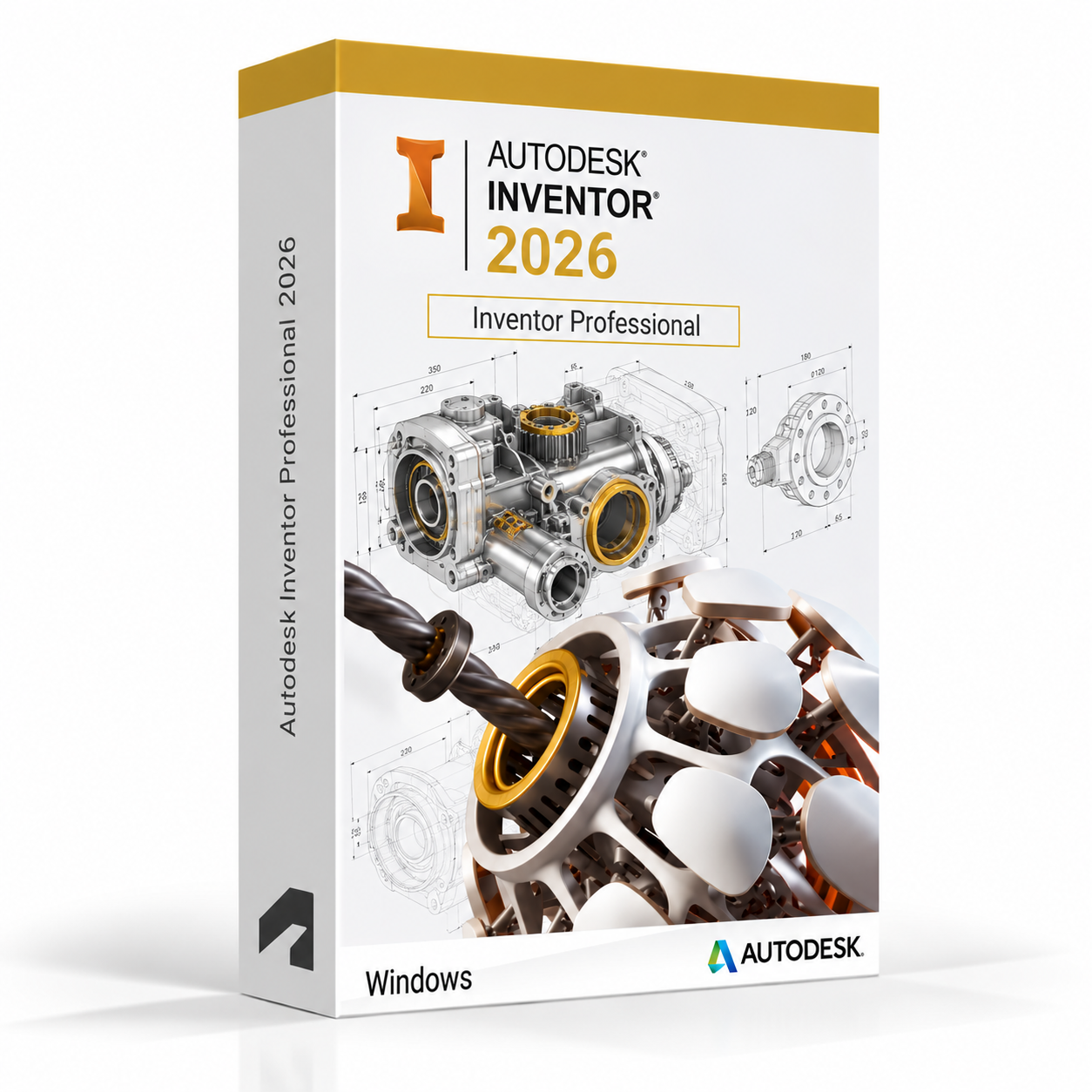
Autodesk Inventor Professional 2026 for Windows – UK Digital Mechanical CAD Licence
Autodesk Inventor Professional 2026 for Windows is a professional 3D mechanical CAD and product design software solution designed for users who need specialised tools for parametric part modelling, assembly design, engineering simulation, sheet metal design, frame design, tube and pipe routing and manufacturing documentation on a Windows PC. It is ideal for mechanical engineering students, product design learners, manufacturing engineering students, CAD technicians and users who need a comprehensive 3D mechanical design workflow covering part modelling, assembly validation, stress analysis, motion simulation and drawing production.
Inventor Professional 2026 combines parametric 3D modelling, assembly design, engineering simulation and manufacturing documentation in a single integrated environment. It helps users design, validate and document mechanical products faster by using intelligent parametric constraints, associative drawing views, automated BOM generation and integrated stress and motion analysis tools. Whether designing individual mechanical parts, complex multi-component assemblies, sheet metal enclosures or frame structures, Inventor Professional provides a professional-grade mechanical engineering design environment on Windows.
For a complete design setup, you can also explore our Autodesk software, compare related products, or choose Autodesk Fusion 360 for Windows if you need a cloud-connected integrated CAD, CAM and CAE platform for product design and manufacturing workflows.
Important Notice About Inventor Professional 2026 for Windows
Autodesk Inventor Professional 2026 is a Windows-only application and is not available natively on macOS. Users who need mechanical CAD software on a Mac should use a compatible Windows environment or consider Autodesk Fusion 360, which is available for both Windows and macOS.
This product is suitable for personal learning, training and non-commercial mechanical engineering and product design projects. If you need Inventor Professional for commercial, manufacturing or professional client work, make sure your licence type clearly allows commercial use.
Why Choose Autodesk Inventor Professional 2026 for Windows?
- Professional 3D mechanical CAD and product design software for Windows users
- Designed for parametric part modelling, assembly design, simulation and manufacturing documentation
- Comprehensive engineering simulation tools including stress analysis and motion simulation
- Dedicated sheet metal, frame design and tube and pipe routing design tools
- Automated BOM generation, parts lists and associative engineering drawing production
- Interoperability with AutoCAD, Fusion 360 and other Autodesk design tools
- Suitable for compatible 64-bit Windows PCs
- Lifetime access according to this product offer
- Digital delivery by email after order confirmation
- Activation instructions included
- Installation and activation support available when needed
Key Features of Inventor Professional 2026
- Parametric Part Modelling: Create precise 3D mechanical parts using parametric feature-based modelling with extrusions, revolves, sweeps, lofts, fillets and other modelling operations driven by fully constrained sketches.
- Assembly Design: Build complex multi-component assemblies using assembly constraints, joints and relationships to position and define the motion of parts within complete product assemblies.
- Engineering Drawing Production: Create fully associative 2D engineering drawings from 3D models with automated view creation, dimensions, tolerances, GD&T symbols, parts lists and title blocks.
- Stress Analysis and FEA: Run finite element analysis stress simulations on individual parts and assemblies to validate designs against engineering loads and identify potential failure points before manufacturing.
- Motion Simulation: Simulate the dynamic motion of assemblies with applied forces, torques and motion inputs to analyse mechanism performance and validate kinematic and dynamic behaviour.
- Sheet Metal Design: Design sheet metal parts with intelligent sheet metal features including flanges, bends, punches, hems and reliefs, with automatic flat pattern generation for manufacturing.
- Frame Design: Create structural frame designs using standard frame generator profiles including beams, columns and channels, with automated frame member placement along model geometry.
- Tube and Pipe Routing: Route rigid and flexible tube and pipe runs through assemblies with intelligent fitting placement, pipe specification management and manufacturing documentation.
- BOM and Parts List Management: Generate and manage Bills of Materials and parts lists directly from assembly models with automated item numbering, quantity tracking and export options.
- iLogic and Automation: Use iLogic rules-based design automation to create configurable product designs, automate repetitive modelling tasks and drive design parameters from external data sources.
- Interoperability: Import and export a wide range of CAD formats including STEP, IGES, DWG, DXF, SAT and others for exchanging data with other design tools and manufacturing systems.
- Model-Based Definition: Apply 3D annotations, tolerances and manufacturing data directly to the 3D model for model-based definition workflows that reduce reliance on 2D drawing documentation.
Inventor Professional 2026 vs Inventor, Fusion 360, SolidWorks and CATIA
Autodesk Inventor Professional 2026 for Windows includes all the tools of standard Inventor plus additional simulation, tube and pipe routing and cable and harness design capabilities. Fusion 360 is a cloud-connected integrated CAD, CAM and CAE platform suited to product design students and makers, SolidWorks is an industry-standard mechanical CAD platform, while CATIA is an enterprise-level multi-discipline CAD platform used in aerospace and automotive design.
| Software | Best For | Main Use |
|---|---|---|
| Inventor Professional 2026 | Mechanical engineers, product designers and manufacturing students | 3D parametric mechanical CAD, assembly design, stress analysis, motion simulation, sheet metal, frame and pipe routing |
| Autodesk Inventor | Mechanical engineers and product design students | 3D parametric mechanical CAD, assembly design, drawing production and manufacturing documentation |
| Autodesk Fusion 360 | Product designers, makers and engineering students | Integrated cloud-connected CAD, CAM, CAE and PCB design for product development and manufacturing |
| SolidWorks | Mechanical engineers, product designers and manufacturing users | 3D mechanical CAD, parts, assemblies, simulations and production drawing workflows |
| CATIA | Aerospace, automotive and complex product design teams | Enterprise-level multi-discipline 3D CAD for complex surface modelling, systems engineering and large-scale assemblies |
Which Software Should You Choose?
- Choose Autodesk Inventor Professional 2026 for Windows if you need a comprehensive 3D mechanical CAD platform with advanced simulation, sheet metal, frame design, tube and pipe routing and manufacturing documentation tools.
- Choose Autodesk Fusion 360 for Windows if you need a cloud-connected integrated CAD, CAM, CAE and PCB design platform for product development and manufacturing workflows.
- Choose SolidWorks if you need an industry-standard mechanical CAD platform for parts, assemblies, simulations and production drawings.
- Choose CATIA if you need an enterprise-level multi-discipline CAD platform for aerospace, automotive or complex product design workflows.
- Choose AutoCAD if you need a DWG-based 2D drafting and 3D CAD platform rather than a dedicated mechanical engineering design tool.
Recommended Products
- Autodesk Software – compare AutoCAD, Revit, Maya, Civil 3D and other Autodesk tools.
- Autodesk Inventor – explore more Inventor versions for Windows.
- Autodesk Fusion 360 for Windows – recommended for integrated cloud-connected CAD, CAM and product design workflows.
- SOLIDWORKS – suitable for mechanical design, product modelling and manufacturing drawings.
- Windows Licences – suitable if you need a compatible Windows operating system.
- Microsoft Office – useful for project documents, spreadsheets, reports and client presentations.
System Requirements for Autodesk Inventor Professional 2026 for Windows
| Component | Requirement |
|---|---|
| Platform | Windows PC |
| Operating System | 64-bit Microsoft Windows 11 or Windows 10 |
| Processor | Basic: 2.5 GHz or faster processor; recommended: 3+ GHz multi-core processor for complex assemblies and simulation |
| Memory | Basic: 8 GB RAM; recommended: 16 GB RAM or more for large assemblies and simulation workflows |
| Display | 1280 x 1024 display minimum; recommended: 1920 x 1080 or higher with True Color |
| Graphics | Minimum: 1 GB GPU compatible with DirectX 11; recommended: 4 GB GPU compatible with DirectX 12 for 3D viewport performance |
| Storage | 40 GB available disk space for Inventor Professional installation; SSD recommended for project files and assemblies |
| Pointing Device | Three-button mouse recommended for 3D viewport navigation |
| Internet | Required for download, installation, sign-in, activation, updates and Autodesk account access |
Delivery and Activation
- Product: Autodesk Inventor Professional 2026 for Windows
- Platform: Windows PC
- Licence Type: Digital licence
- Use Type: Educational, personal and non-commercial use
- Licence Duration: Lifetime access according to this product offer
- Delivery Method: Digital delivery by email
- Activation: Activation instructions provided after purchase
- Support: Installation and activation assistance available
How to Get Started
- Complete your order for Autodesk Inventor Professional 2026 for Windows.
- Receive your product details and activation instructions by email.
- Check that your Windows PC meets the Inventor Professional 2026 system requirements.
- Download and install Inventor Professional 2026 on your compatible Windows computer.
- Sign in with the Autodesk account or activation method provided with your order.
- Follow the activation instructions to complete setup.
- Restart Inventor Professional if required and begin your 3D mechanical CAD and engineering workflow.
- Contact our support team if you need help with installation or activation.
Who Is Autodesk Inventor Professional 2026 for Windows For?
- Mechanical engineering students and product design learners
- Manufacturing engineering and industrial design students
- Sheet metal, frame and pipe routing design learners
- Engineering simulation and stress analysis students
- CAD technicians working on mechanical parts and assemblies
- Users working on BOM management and manufacturing documentation workflows
- Users who need a professional-grade 3D mechanical CAD platform on Windows
Important Licence Information
This Autodesk Inventor Professional 2026 for Windows licence is intended for educational, personal and non-commercial use. It is suitable for learning, training and personal mechanical engineering and product design projects. It should not be used for commercial, manufacturing or professional client work unless your licence type clearly allows commercial use.
Inventor Professional is a Windows-only application and is not available natively on macOS. Before purchasing, please make sure your Windows PC is compatible with Inventor Professional 2026 and that this licence type matches your intended use.
What is Autodesk Inventor Professional 2026 for Windows?
Autodesk Inventor Professional 2026 for Windows is a professional 3D mechanical CAD and product design software for parametric part modelling, assembly design, stress analysis, motion simulation, sheet metal design, frame design, tube and pipe routing and manufacturing documentation on compatible Windows PCs.
Does Inventor Professional 2026 work on Windows 11?
Yes. Inventor Professional 2026 is designed for compatible 64-bit Windows systems, including Windows 11.
Can I install Inventor Professional 2026 on Windows 10?
Yes. Inventor Professional 2026 supports compatible 64-bit Windows 10 systems.
Does Inventor Professional 2026 work on Mac?
No. Autodesk Inventor Professional is a Windows-only application and is not available natively on macOS. Mac users who need mechanical CAD software should consider Autodesk Fusion 360, which is available for both Windows and macOS.
What is the difference between Inventor and Inventor Professional?
Inventor Professional includes all the tools of standard Inventor plus additional capabilities including advanced stress analysis, dynamic simulation, tube and pipe routing and cable and harness design tools, making it the more comprehensive option for users who need a full mechanical engineering and simulation workflow.
What is the difference between Inventor Professional and Fusion 360?
Inventor Professional is a dedicated desktop-based mechanical CAD platform focused on parametric part and assembly design, engineering simulation and manufacturing documentation for professional mechanical engineering workflows. Fusion 360 is a cloud-connected integrated platform covering CAD, CAM, CAE and PCB design, suited to product design students, makers and engineering learners who need an all-in-one design and manufacturing tool.
Does Inventor Professional include stress analysis tools?
Yes. Inventor Professional includes finite element analysis stress simulation tools for running structural analysis on parts and assemblies, allowing users to validate designs against engineering loads and identify potential failure points before manufacturing.
Does Inventor Professional include sheet metal design tools?
Yes. Inventor Professional includes dedicated sheet metal design tools with intelligent sheet metal features including flanges, bends, punches, hems and reliefs, and automatic flat pattern generation for use in manufacturing documentation.
What is iLogic in Inventor Professional?
iLogic is a rules-based design automation feature in Inventor Professional that allows users to create configurable product designs, automate repetitive modelling tasks and drive design parameters from external data sources using built-in rules and logic without advanced programming knowledge.
Can I use this licence for commercial projects?
This product is described as an educational licence for personal, learning and non-commercial use. Commercial use requires a licence type that allows commercial work.
How will I receive my Inventor Professional 2026 licence?
Your product details and activation instructions will be delivered digitally by email after order confirmation.
Do you provide installation support?
Yes. Installation and activation support is available if you need help setting up Autodesk Inventor Professional 2026 for Windows.




Esme W. –
So simple and straightforward.
Molly T. –
Excellent service, no complications at all. Everything was fast and reliable.
Luke J. –
Smooth, quick, and trustworthy. Everything was done in minutes.
Stephen K. –
I was genuinely impressed with the speed of the activation. The process was straightforward, the steps were clear, and everything worked right away. I didn’t encounter any complications or delays. It felt very secure and reliable the whole time. I’m extremely happy with the service.
Victoria E. –
From the moment I placed the order, everything felt professional and well-organized. The activation was done almost instantly, and everything worked exactly as described. The whole process was easy to understand and very quick. I’m genuinely impressed.
Abigail M. –
Everything worked as promised.
Oliver M. –
The whole service exceeded my expectations. Everything was completed quickly and without hassle. It felt professional and trustworthy the entire time. I’ll be returning for sure.
Bradley W. –
I was impressed by the professionalism of the service. Everything worked the first time without problems. The process was smooth, quick, and reliable. Great experience overall.
Simon R. –
I appreciated how seamless everything was. The whole process took just minutes, and everything worked right away. It was very reliable and easy to use. Excellent service.
Adam S. –
I was pleasantly surprised at how smooth the process was. Everything happened within minutes, and I had no problems. The service was professional and trustworthy. Excellent overall.
Simon H. –
I was very happy with the speed and efficiency. The activation happened instantly without errors. Everything felt professional and stress-free. It gave me complete confidence in the service. I’ll be returning.
Ella P. –
Professional service, very efficient.
Elliot L. –
This was my first order, and I can honestly say the service was outstanding. Everything worked instantly without any hiccups. The process was stress-free, and I felt comfortable using it from start to finish. It was professional, reliable, and efficient. I’ll certainly be back again.
Luke G. –
Very fast service, everything worked perfectly.
Sarah C. –
I felt confident using this service. Everything was smooth and reliable.
Simon B. –
The service worked exactly as promised. Everything was fast, reliable, and stress-free. I had a great experience from start to finish. I’ll definitely return.
William E. –
Smooth process and quick activation.
Richard B. –
The ordering was simple, and activation happened almost instantly. Everything worked perfectly without any complications. I appreciated how professional the service felt at every step. It gave me complete confidence in the process. I will definitely use it again.
Freya P. –
Not perfect, but acceptable overall.
Adam B. –
The whole thing felt simple and well explained. I didn’t feel lost at any point.
Samuel P. –
Activation worked fine after installation.
Elliot E. –
Easy to install and worked straight away.
Oscar R. –
Worked once I followed the steps.
Tom T. –
Everything worked, though it took some patience.
Rania C. –
It wasn’t as smooth as I expected, but it also wasn’t a headache. Just a fairly normal setup that required some patience.
Emily T. –
Instructions were clear enough, even if not perfectly written.
Craig H. –
It didn’t fail or crash at any point.
James T. –
Fairly simple once I started.
Sophie B. –
Took a few minutes, that’s all.
Pauline S. –
Very easy to set up and use.